Fastrack Web Portal

On-Line Purchasing

Order from vendors without the time consuming phone calls or faxes. Order on-line from Invacare Supply Group, Medline, Gulf South, McKesson and other wholesalers and manufacturers.

Networking Web Portal

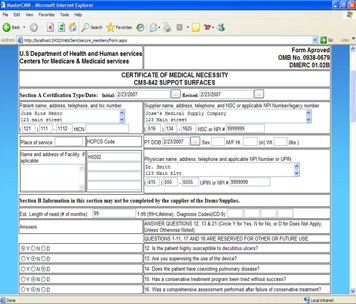
Now your business partners can securely access and enter data via the web. Physicians can complete CMNs on-line. Referral sources can enter new patients. Sales Reps and clients can enter orders, virtually eliminating the need to enter data in the office.

Internet StoreFront

The Fastrack StoreFront offers providers a full solution to create a professional Internet presence to start generating additional revenue, accept insurance, credit and debit cards, Paypal and more. Orders and client information flow directly into the Fastrack System.


Available Standalone or
Integrated with Fastrack!


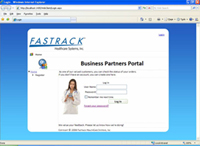
Networking Business Partner Portal

Latest News!

PRODUCT UPDATE

Document Management
"Go Paperless"

Facilitates the creation of a separate ERN835 for each patient, placing a copy in the patient record. Batch scan documents including delivery tickets for automatic insertion into the patient record.


With the Fastrack Web Portal physicians can complete CMNs, referral sources can enter new patient demographics and sales reps, as well as clients, can enter order requests, eliminating the need to re-key data in the office.  Just a few examples of the many benefits offered by the Fastrack “Web Portal.”


Secure web access is provided for doctors, nurses, respiratory therapists, referral sources, sales reps, patients and wholesale accounts.  The Web Portal fully integrates into the Fastrack HME, Infusion and HomeCare Agency software automating the entry and access to data offering an extensive array of benefits to providers.


CMN

Physicians complete and digitally sign CMN’s

On-Line with the Fastrack Web Portal.


Key Features/Benefits


bullet

Reduce paperwork and data entry.

bullet

Important sales tool to aid in generating new business.

bullet

Makes it easier for “partners” to do business with the provider and enhances the image of the business.

bullet

Helps integrate external sources with the Provider’s business.

bullet

Automates the generation of new patients and orders.

bullet

Customizable Home Page with business partner (user) log in ID and password fields.

bullet

Add text, photographs and logos.

bullet

Provides single point of access for external users.

bullet

Link to Fastrack Store Front (optional module).

bullet

Provides secure access for doctors, sales reps, referral sources, patients, etc. to review and enter information based on permissions and criteria established by the Provider.

bullet

Referral Area:

bullet

Request delivery schedules

bullet

Place order requests

bullet

Update demographic information on their patients (Request to be sent back to office personnel)

bullet

Fill in a patient referral form on-line (Request to be sent back to office personnel)

bullet

Check status of patients/orders connected to the referrals.

bullet

Lookup products and pricing

bullet

Sales Person Area:

bullet

Place Orders

bullet

Update demographic information on their patients (Request to be sent back to office personnel)

bullet

Create Schedule for re-occurring Orders.

bullet

Run usage reports (by diagnosis, product category, HCPC, therapy, etc.)

bullet

Ability to print the Open order report (for their own orders)

bullet

Check Status/Statistics related to the referrals

bullet

Number of New Orders

bullet

Number of New Rentals

bullet

Total $ delivered for a date range

bullet

List of patients connected to the sales person sorted by Alpha, Doctor, or referral


bullet

Lookup products and pricing

bullet

Doctor Area:

bullet

Place Order Requests

bullet

Check status on Patients/Orders connected to the doctor

bullet

Update demographic information on their patients (Request to be sent back to office personnel)

bullet

Check which patients need CMNs or other forms filled

bullet

Sign above forms with a Verisign signature.

bullet

Fill in a patient referral form on-line (to be sent to back office personnel)

bullet

Lookup products and pricing

bullet

Customer Area:

bullet

Place Orders

bullet

Update Demographic information on their account (Request to be sent back to office personal)

bullet

Create Delivery schedules of products (Request to be sent back to office personal)

bullet

Check order status and delivery history connected to their account.

bullet

Nurses Area:

bullet

Check schedules

bullet

Review patient information

bullet

Complete forms on-line